Front-desk command center for live arrivals, kiosk fleet launch, and instant host approvals
Designed specifically for receptionists and gate keepers: monitor real-time visitor volumes, fast-track pre-booked appointments, process walk-in passes with webcam photos, and launch self-service tablet kiosks with one click.
Components of the Receptionist Dashboard

6 Live Operational KPI Cards
Instant counters for Today's Visitors, Currently Inside, Waiting for Approval, Upcoming Appointments, Completed Checkouts, and Security Flags.

Core Navigation: Check-In Desk & Form
Dedicated sidebar views to switch seamlessly between live KPI telemetry, active Check-In Desk rosters, and rapid Check-In Forms.

Universal Header Search
Header search bar for instantaneous real-time querying across visitor names, hosts, departments, and pre-booked appointments.
1-Click Kiosk Fleet Launcher
Launch connected front-desk iPads or Android tablets directly into full-screen self-service kiosk check-in mode from reception.

Traffic & Visitor Type Split Charts
Interactive date-range filtered bar charts showing daily visitor volume alongside a donut breakdown of Walk-in vs Appointment traffic.

Peak Hours Curve & Expected Queue
Hourly live traffic curve (9 AM – 9 PM) for lobby crowd management paired with a live roster of expected upcoming appointments.
Front-desk & gate keeper operational controls
Front-Desk Check-In & Gate Passes
Core Workflow- Process walk-in visitors with host assignment and visit purpose
- Fast-scan QR codes from pre-appointment email and WhatsApp passes
- Capture live visitor portrait photo with integrated webcam
- Collect on-screen NDA sign-off and safety guidelines acceptance
- Automated instant thermal badge printing with Zebra and Dymo support
Queue Management & Host Approvals
Live Coordination- Track pending host approvals in real-time with automatic follow-ups
- Manually trigger or resend WhatsApp, SMS, or email arrival notifications
- Quickly advance scheduled appointment attendees without re-typing data
- Flag security risks or deny entry with logged security justification
- Add private internal notes to visitor records visible to security
Traffic Analytics & Shift Checkout
Real-time Records- Live roster of everyone currently inside with time elapsed
- Instant 1-click checkout with automated QR pass invalidation
- Hourly peak traffic distribution curves (9 AM – 9 PM peak insights)
- Visitor breakdown by category (Walk-in vs Pre-booked Appointment)
- Export comprehensive shift logs (CSV/PDF) for audit and security handover
Dedicated modules inside the Receptionist Dashboard
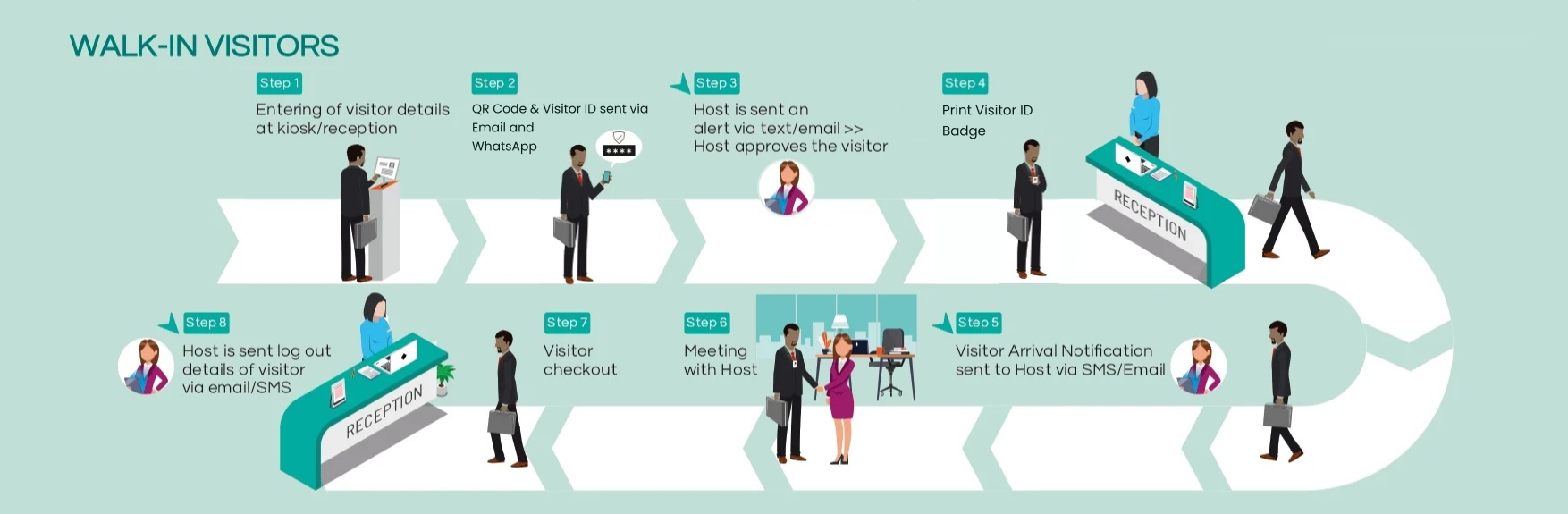
Walk-In Registration Flow
A rapid multi-step form built for speed at high-traffic front desks. Captures visitor name, mobile number, government ID type, meeting host, and photo snap. Automatically checks against blacklists and prints badges upon submission.
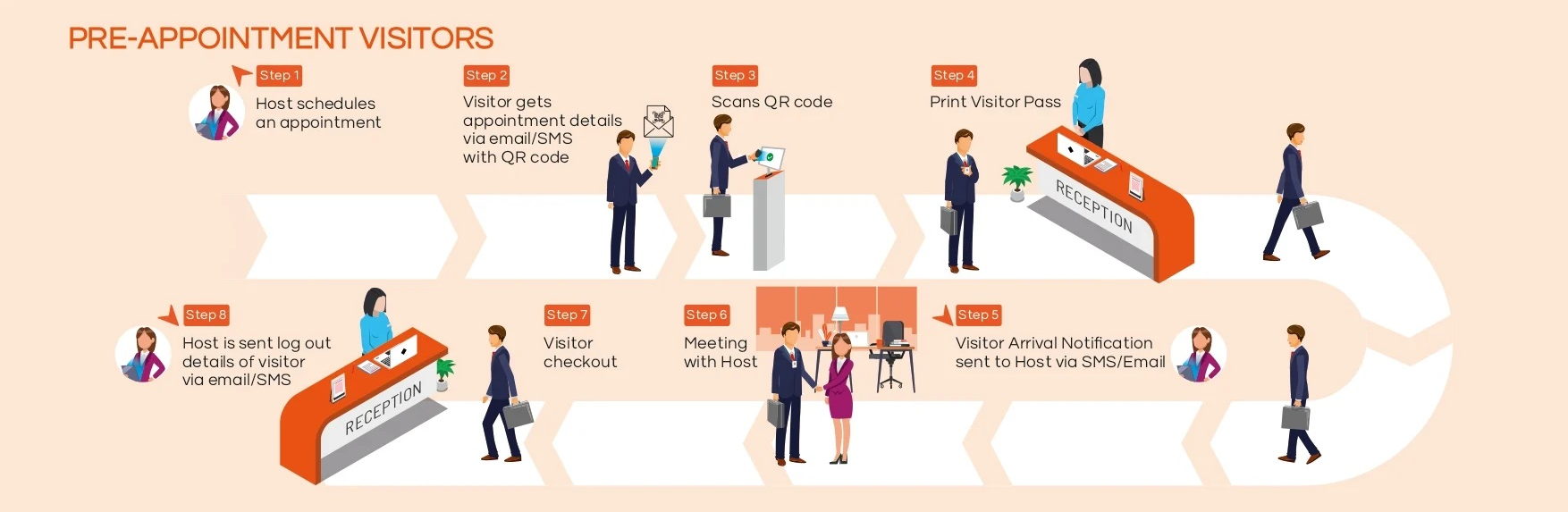
Pre-Registration Queue
Displays all pre-invited guests with their assigned host, arrival window, and QR pass status. Front-desk staff scan the visitor's mobile QR pass or search by mobile number to mark arrival in under 3 seconds.
Host Approval Workflow Panel
Tracks approval state for every active arrival. If an executive host has not acknowledged an arrival ping, receptionists can resend WhatsApp or phone reminders directly from the queue without restarting the visit entry.
Live On-Premises Visitor Log
Filterable live grid of every visitor currently on site. Staff see check-in timestamps, host employee, badge ID, and parking bay. Checkout is performed with a single click, instantly invalidating gate access.
Self-Service Kiosk Launcher
Integrated kiosk fleet management button on the dashboard header. Receptionists can launch one or multiple mounted iPad/tablet devices into lockdown self-service guest check-in mode directly from their desktop browser.
Traffic Curve & Peak Hour Insights
Interactive analytics widget featuring multi-year calendar date-range selection, daily visitor trends, and hourly rush-hour curves to optimize lobby staffing during peak morning and afternoon windows.
Configuring the Receptionist Dashboard in 5 Steps
- 1
Assign Receptionist or Gate Keeper roles
In User Management, assign staff to the Receptionist or Gate Keeper role. Staff gain instant desktop access to the live dashboard with tenant-isolated data upon login.
- 2
Configure check-in forms and custom fields
Use the Form Builder to configure required fields for walk-ins (e.g. government ID, vehicle number, photo capture requirement, NDA terms).
- 3
Connect badge printers and design templates
Pair Zebra ZD series or Dymo thermal printers over network or USB. Configure badge labels with visitor photo, dynamic QR code, and host name.
- 4
Set up WhatsApp, SMS, and Email alert triggers
Configure automated host notifications to dispatch via WhatsApp and SMS the moment a visitor checks in or requests host approval.
- 5
Pair and launch tablet kiosks
Link tablet kiosk devices to the location. Reception staff can launch kiosks into full-screen guest check-in mode directly from the dashboard header.
Receptionist Dashboard system specifications
Core Navigation & Controls
- Sidebar views
- Dashboard (overview), Check-In Desk (live roster), Check-In Form (rapid entry)
- Universal search
- Instant lookup across visitors, hosts, and scheduled appointments
- Kiosk fleet launch
- 1-Click Launch Kiosk action with device selector dropdown
- Operator session
- Authenticated operator profile, live shift date, and notification center
Live KPI Telemetry (6 Cards)
- Today's visitors
- Daily volume counter tracking total visits processed
- Currently inside
- Live occupancy counter for facility security and mustering
- Waiting for approval
- Real-time count of visitors awaiting host confirmation
- Upcoming appointments
- Scheduled pre-booked visits arriving during the shift
- Today checkout
- Count of completed visits with logged exit timestamps
- Rejected visitors
- Security flags and denied entries logged with justification
Traffic Analytics & Queues
- Visitor traffic chart
- Daily volume bar chart with interactive date-range calendar filter
- Visitor type split
- Donut chart tracking Walk-In vs Pre-booked Appointment distribution
- Peak hours curve
- Hourly live traffic curve across operational hours (9 AM – 9 PM)
- Expected visitors
- Live roster of upcoming scheduled arrivals and host assignments
Frequently Asked
Questions
Couldn't find what you were looking for?
KaarobaarMeet.ai is a full-stack digital ecosystem OS designed for modern Indian business infrastructure. It powers every touchpoint of visitor check-in, multi-room event scheduling, and enterprise facility operations — replacing physical logbooks with self-service kiosks, encrypted QR passes, instant WhatsApp host alerts, and real-time operations dashboards.
The platform includes 24 modular micro-apps covering Visitor Management, Event Automation, Smart Parking, Smart Badges & Wristbands, Member Directories, Startup Trackers, and Live Command Centers — all accessible under a unified tenant and single sign-on.
Yes. KaarobaarMeet.ai provides an enterprise multi-tenant hierarchy with 13 role-based portals. Corporate headquarters get unified analytics across all cities and branches, while individual security gates, reception desks, and event coordinators operate dedicated local interfaces.
Any standard iPad, Android tablet, touchscreen kiosk terminal, or desktop computer. For physical passes, the system integrates seamlessly with standard thermal printers (Zebra, Brother, TSC) via USB, Bluetooth, or local network.
Pre-registered visitors receive an encrypted QR entry pass directly on WhatsApp prior to arrival. When they arrive and scan in at the reception kiosk or gate, the system alerts the host on WhatsApp instantly with the visitor's photo, designation, and company name.
Streamline your front desk and gate operations
Empower your reception staff with real-time arrivals, instant WhatsApp host alerts, and zero-paper check-ins.